
Last updated on
Nov 7, 2026
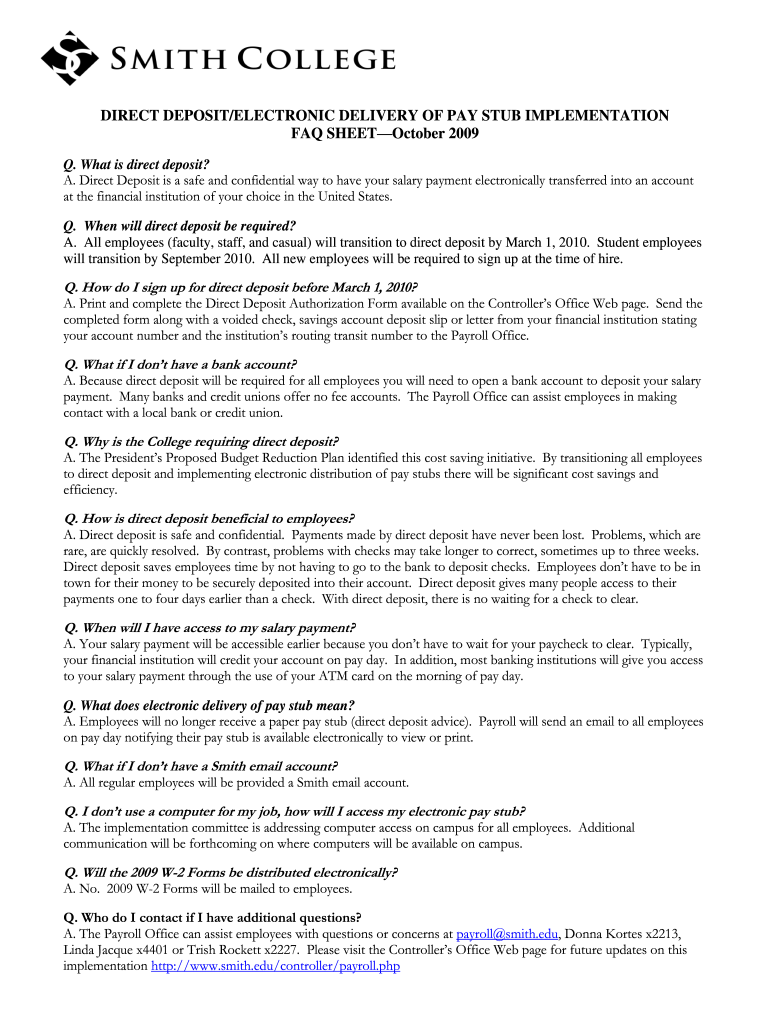
Smith College Direct Deposit/Electronic Delivery of Pay Stub Implementation FAQ Sheet 2009-2026 ...
We are not affiliated with any brand or entity on this form

Fill out
Complete the form online in a simple drag-and-drop editor.

eSign
Add your legally binding signature or send the form for signing.

Share
Share the form via a link, letting anyone fill it out from any device.

Export
Download, print, email, or move the form to your cloud storage.
Why pdfFiller is the best tool for your documents and forms


End-to-end document management
From editing and signing to collaboration and tracking, pdfFiller has everything you need to get your documents done quickly and efficiently.
Accessible from anywhere
pdfFiller is fully cloud-based. This means you can edit, sign, and share documents from anywhere using your computer, smartphone, or tablet.
Secure and compliant
pdfFiller lets you securely manage documents following global laws like ESIGN, CCPA, and GDPR. It's also HIPAA and SOC 2 compliant.
What is Smith College Direct Deposit/Electronic Delivery of Pay Stub Implementation FAQ Sheet
The Direct Deposit Authorization Form is a document used by employees to facilitate the electronic deposit of their payroll funds directly into their bank accounts.
pdfFiller scores top ratings on review platforms




My experience filling out the form and printing was excellent.
Pretty straight forward.
Easy to use, and efficent.
Good value!
Just what it says
Great service for what our company needed. Integrates well with other apps/programs for ease of use.
Thank-you!
Who needs Smith College Direct Deposit/Electronic Delivery of Pay Stub Implementation FAQ Sheet?
Explore how professionals across industries use pdfFiller.

Smith College Direct Deposit/Electronic Delivery of Pay Stub Implementation FAQ Sheet is needed by:
-
Employees at colleges or universities looking for direct deposit options
-
Human resources personnel managing payroll and benefits
-
New hires requiring guidance on electronic pay delivery
-
Payroll office staff facilitating direct deposit processes
-
Financial coordinators overseeing employee compensation systems
Comprehensive Guide to Smith College Direct Deposit/Electronic Delivery of Pay Stub Implementation FAQ Sheet
What is the Direct Deposit Authorization Form?
The Direct Deposit Authorization Form is a critical document that enables employees to receive their payments electronically. This form plays a significant role in streamlining the payroll process by allowing funds to be directly deposited into an employee's bank account. By utilizing the Direct Deposit Authorization Form, employees can access their earnings quickly and securely through electronic pay stub delivery.
This form facilitates the efficient transfer of payments, ensuring that employees can rely on timely deposits without the hassle of checks. The integration of the Direct Deposit Authorization Form into payroll systems has become a standard practice in many organizations, enhancing convenience for both employers and employees.
Purpose and Benefits of the Direct Deposit Authorization Form
Completing the Direct Deposit Authorization Form offers significant advantages for employees. One of the primary reasons to fill out this form is the convenience provided by direct deposits compared to traditional paper checks. With this setup, employees can avoid the delays associated with physical check processing.
Additionally, this form supports electronic pay stub delivery, allowing employees to access their pay information online. Other key benefits include quicker access to funds, reducing the wait for checks to clear, and minimizing the risk of lost or stolen checks, making it a secure option for employee direct deposit.
Who Needs the Direct Deposit Authorization Form?
All eligible employees are required to complete the Direct Deposit Authorization Form to receive their payments through direct deposit. This requirement applies across various industries, including specific scenarios for employees at colleges and universities who wish to streamline their pay processes.
Whether working full-time, part-time, or in temporary positions, employees in educational institutions can benefit from utilizing this form to ensure timely payroll deposits directly into their accounts.
Eligibility Criteria for Direct Deposit
To utilize the Direct Deposit Authorization Form, employees must meet certain eligibility criteria. These typically include being an active employee, having a valid bank account, and fulfilling other organizational requirements.
In some cases, there may be specific age or employment duration criteria set by the employer. It is essential for employees to verify these requirements, ensuring they are qualified to participate in the direct deposit program.
How to Fill Out the Direct Deposit Authorization Form Online
Filling out the Direct Deposit Authorization Form online is a straightforward process. Follow these steps to complete and submit the form using pdfFiller:
-
Access the Direct Deposit Authorization Form on pdfFiller.
-
Input required information, including banking details.
-
Attach a voided check or bank letter as needed.
-
Review all entries for accuracy.
-
Add your digital signature to finalize the form.
-
Submit the completed form electronically.
This process ensures that employees have a secure and efficient way to fill out and submit their forms, enhancing the overall payroll experience.
Supporting Documents Required for Submission
When submitting the Direct Deposit Authorization Form, employees must provide specific supporting documents. A voided check or bank letter is essential as it verifies the account information needed for direct deposit.
Additionally, employees may need to present identification or proof of employment. Having these documents ready will expedite the submission process and ensure compliance with employer requirements.
Where and How to Submit the Direct Deposit Authorization Form
Employees can submit the Direct Deposit Authorization Form through various methods. Options include online submission via pdfFiller, in-person delivery to the payroll office, or sending the form through email.
For inquiries or assistance, employees can reach out to the Payroll Office, which is equipped to help with the submission process and answer any questions related to direct deposits.
Common Errors and How to Avoid Them
While completing the Direct Deposit Authorization Form, employees may encounter common errors that can delay processing. Frequent issues include providing incorrect bank details or forgetting to sign the form.
To avoid these mistakes, it is advisable to thoroughly review the form before submission. Double-checking all entries can help ensure that the registration for direct deposit proceeds without complications.
Security and Compliance for Direct Deposit Authorization Forms
Security is a top priority when handling Direct Deposit Authorization Forms. pdfFiller implements robust measures, including 256-bit encryption, to safeguard sensitive information throughout the submission process.
Moreover, compliance with important regulations like HIPAA and GDPR ensures that employee data is handled with the highest level of privacy and protection, giving users peace of mind while transmitting their information.
Utilizing pdfFiller for Your Direct Deposit Authorization Form Needs
pdfFiller provides a seamless experience for filling out and managing the Direct Deposit Authorization Form. One of the benefits of using pdfFiller is the ability to access documents in the cloud, making it easy for employees to edit and submit forms as needed.
This platform streamlines the entire direct deposit form process, allowing employees to focus on their tasks while ensuring their payroll needs are met efficiently.
How to fill out the Smith College Direct Deposit/Electronic Delivery of Pay Stub Implementation FAQ Sheet
-
1.To access the Direct Deposit Authorization Form on pdfFiller, visit the pdfFiller website and use the search bar to locate the form by typing in its name.
-
2.Once the form is displayed, click on it to open in the pdfFiller editor where you can begin filling it out.
-
3.Gather all necessary information such as your bank account details and a voided check before you begin filling in the form.
-
4.Begin filling out the form by clicking on the editable fields, and input your information accurately into each designated area.
-
5.For any fields that require additional information, ensure you provide the required details as specified in the instructions attached to the form.
-
6.After completing the form, take a moment to review all entered information for accuracy and completeness to avoid common submission errors.
-
7.Once satisfied with your entries, finalize the form by saving your changes in pdfFiller to prevent data loss.
-
8.You can download the completed form, share it directly via email, or submit it through specific channels indicated in your college's payroll guidelines.

Who is eligible to complete the Direct Deposit Authorization Form?
Any employee at the college, including full-time, part-time, and new hires, is eligible to complete the Direct Deposit Authorization Form to set up electronic pay deposits.
What documents are needed to complete the Direct Deposit Authorization Form?
To complete this form, you will need your bank account information including account number, routing number, and a voided check or a letter from your bank confirming your account details.
Is there a deadline for submitting the Direct Deposit Authorization Form?
It is recommended to submit the Direct Deposit Authorization Form at least two weeks prior to the payroll processing date to ensure timely enrollment.
What are the common mistakes when filling out this form?
Common mistakes include entering incorrect bank account numbers, not including necessary documents like a voided check, and neglecting to sign the form where required.
How do I submit the completed Direct Deposit Authorization Form?
After completing the form, you can submit it by following your payroll office's specific submission methods, which may include uploading it through an online portal or directly emailing it to the Payroll Office.
How long does it take for direct deposit to start after submitting the form?
Typically, it takes one to two payroll cycles for the direct deposit to be activated after the form has been submitted and approved by the payroll department.
Related Forms

Related Catalogs
Get the latest insights from our blog



If you believe that this page should be taken down, please follow our DMCA take down process
here
.
This form may include fields for payment information. Data entered in these fields is not covered by PCI DSS compliance.